Updating an encapsulated plugin
This help file describes newer “encapsulated” plugins that are installed under zc_plugins. For older plugines which are copied directly into the includes and admin folders, see How to install a non-encapsulated plugin.
This guide is about updating plugins which are already installed. For basic plugin information and a how-to on installing plugins, see How to install an encapsulated plugin.
Getting Started
Before you start, you’ll need to verify that you have some things.
- Plugins are provided in zip format, so you’ll need a tool to unzip the file.
- You’ll need a tool to transfer the files from your local PC to your webserver.
Updating
-
Copy the files from the unzipped plugin into the
zc_pluginsfolder in your cart. You will now see multiple folders under the plugin’s name folder. For example, with POSM, underzc_plugins/POSM/you might see folders forv6.1.1andv6.2.0. -
In your admin, navigate to Modules > Plugin Manager.
-
Select the new plugin you wish to update.
-
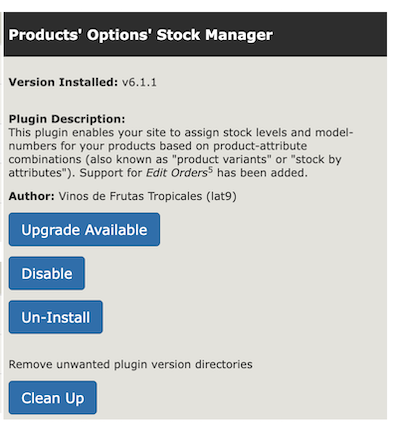
You will see in the right hand infobox that the “Upgrade Available” button is shown. Click it.
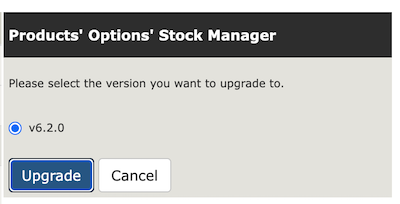
- Select the version and click “Upgrade” again.
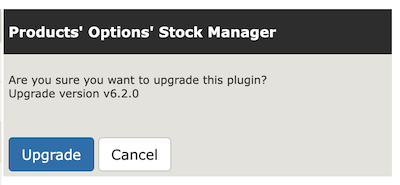
- A dialog is persented which allows you to cancel. Instead, click “Upgrade”
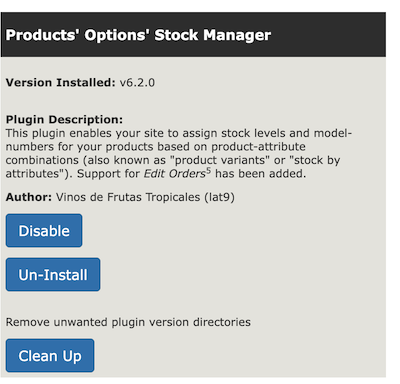
- Once this is complete, the infobox will show the plugin running the upgraded version. You’re done!